Αυτοματισμοί και AI
Οι επανεπικοινωνίες γίνονται ακόμη κι όταν είστε απασχολημένοι
Οι αυτοματισμοί στο Nelxa είναι ρητοί κανόνες που μπορείτε να διαβάσετε, να δοκιμάσετε και να απενεργοποιήσετε, με ημερολόγιο κάθε εκτέλεσης. Το AI είναι προαιρετικό, χρησιμοποιεί το δικό σας κλειδί παρόχου και παράγει προσχέδια που ελέγχει άνθρωπος.
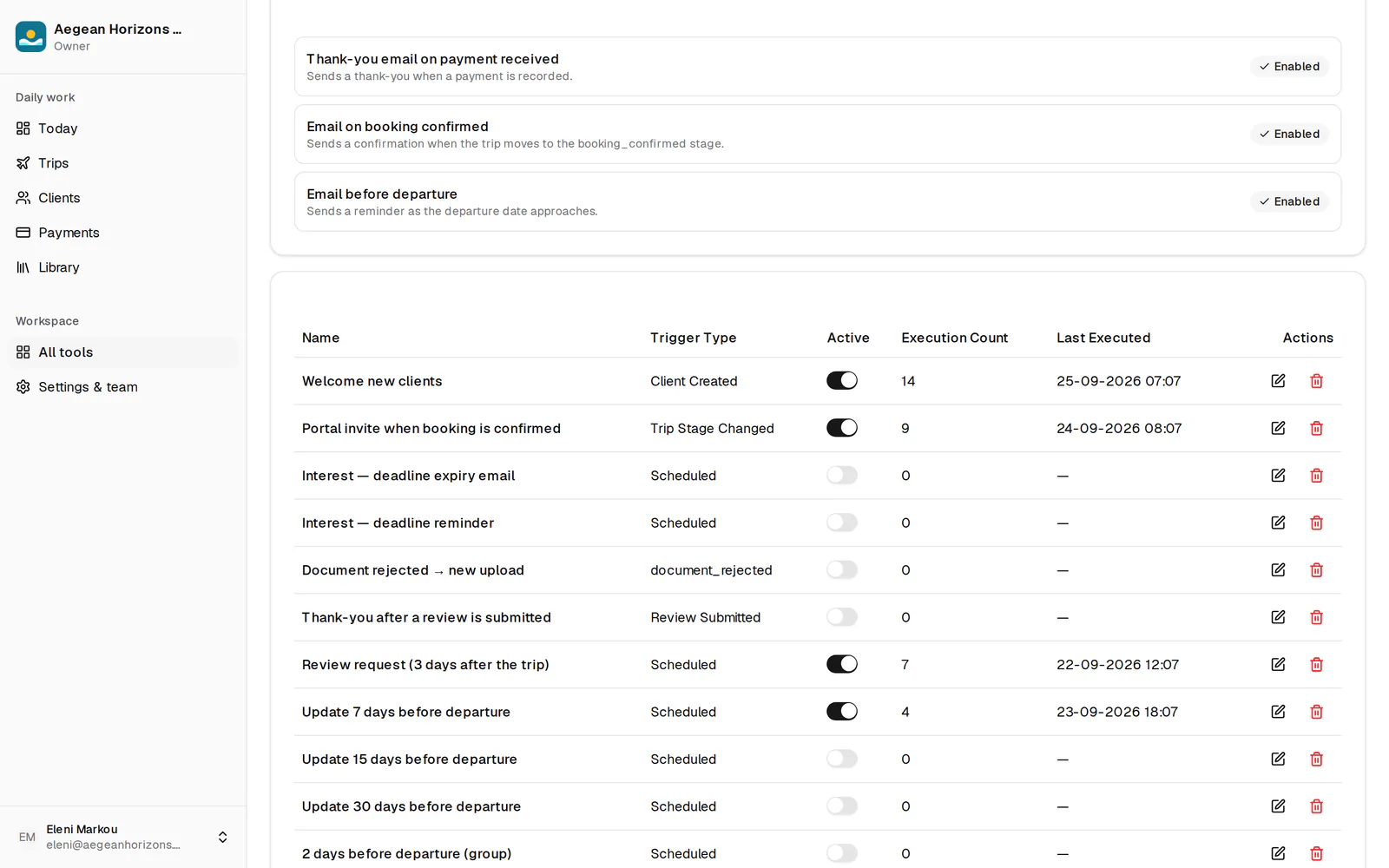
Κανόνες με ενεργοποιήσεις, συνθήκες και ενέργειες
Ενεργοποιήσεις: αλλαγή σταδίου, πληρωμή που ελήφθη ή καθυστερεί, ταξίδι που πλησιάζει ή ολοκληρώθηκε, νέος πελάτης, γενέθλια, επέτειος ταξιδιού, υποβολή αξιολόγησης, απόρριψη εγγράφου και χρονοπρογραμματισμός.
Πακέτο εκκίνησης για αρχή
Εγκαταστήστε ένα επιμελημένο σύνολο κανόνων και προτύπων email στη γλώσσα σας. Το Standard περιλαμβάνει τα 15 βασικά email προς πελάτες (επιβεβαιώσεις κράτησης και πληρωμής, υπενθυμίσεις πληρωμών, ενημέρωση πριν από το ταξίδι, ειδοποιήσεις επιστροφής χρημάτων και απόρριψης), τα οποία ενεργοποιείτε ή απενεργοποιείτε. Οι χώροι εργασίας Premium διαθέτουν τον πλήρη επεξεργαστή κανόνων, για να αλλάζετε οποιονδήποτε κανόνα και να δημιουργείτε δικούς σας.
Χρονόμετρα SLA προμηθευτών
Ξεκινήστε ένα χρονόμετρο όταν στέλνετε αίτημα κράτησης, επιβεβαίωσης ή ακύρωσης σε προμηθευτή· το Nelxa κλιμακώνει όταν η προθεσμία περάσει χωρίς απάντηση.
Ακολουθίες επανεπικοινωνίας και προγραμματισμένες ενέργειες
Ακολουθίες πολλών βημάτων μετά το τέλος ενός ταξιδιού ή μια κράτηση, και μεμονωμένες ενέργειες προγραμματισμένες για συγκεκριμένη ημερομηνία: email, εργασίες, ειδοποιήσεις ή webhook.
Εισερχόμενα με AI και το δικό σας κλειδί
Συνδέστε OpenAI, Anthropic ή Google AI με το δικό σας κλειδί API, αποθηκευμένο κρυπτογραφημένο. Εισερχόμενα email και PDF μετατρέπονται σε δομημένες εργασίες προς έλεγχο.
Κάθε εκτέλεση καταγράφεται
Κάθε εκτέλεση καταγράφει το γεγονός ενεργοποίησης, τις ενέργειες που έγιναν και τυχόν σφάλμα, ανά ταξίδι και ανά πελάτη, ώστε ο αυτοματισμός να μη γίνεται ποτέ μαύρο κουτί.
Συχνές ερωτήσεις
Θα στείλουν οι αυτοματισμοί email στους πελάτες μου χωρίς να το ξέρω;
Τρέχουν μόνο οι κανόνες που ενεργοποιήσατε, και κάθε εκτέλεση καταγράφεται. Οι έλεγχοι ετοιμότητας εμποδίζουν την αποστολή μηνύματος σε γλώσσα στην οποία δεν υπάρχει το πρότυπο.
Χρειάζομαι συνδρομή AI;
Μόνο αν θέλετε τις δυνατότητες AI. Φέρνετε το δικό σας κλειδί παρόχου· το Nelxa δεν μεταπωλεί χρήση AI.
Τι κάνει στην πράξη το AI;
Αναλύει email και PDF σε δομημένες εργασίες, συντάσσει προσχέδια, μεταφράζει και βαθμολογεί ποιότητα και διάθεση. Ένας άνθρωπος ελέγχει πριν φτάσει οτιδήποτε σε πελάτη.
Έτοιμοι να λειτουργήσετε το γραφείο σας με το Nelxa;
Στήστε τον χώρο εργασίας σας σε λίγα λεπτά. Δωρεάν όσο διαρκεί η beta· οι πρώτοι πελάτες κερδίζουν 30% έκπτωση για 12 μήνες όταν ανακοινωθούν οι δημόσιες τιμές.
Ή γράψτε στο hello@nelxa.com για μια παρουσίαση.